

The Sucuri Firewall protects your site while improving load times with high performance caching. Faster pages can also improve SEO.
Sucuri offers four caching options. You can see them all under Performance -> Caching Level in Sucuri Firewall’s settings.
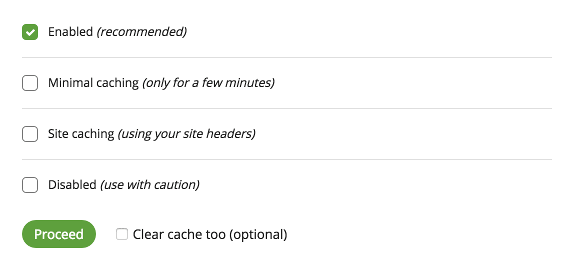
To understand which caching level is best suited for your website, use this comparison table:
| Caching Level | Recommended Site Type | Page Caching Time | Redirects (301/302) Caching Time | Not Found (404) Caching Time | Respects Caching Headers* |
|---|---|---|---|---|---|
| Enabled | Static websites, no dynamic content and infrequent updates. | 180 minutes | 180 minutes | 4 minutes | No |
| Minimal Caching | News portal, blogs or sites with content updated daily and no user sessions. | 8 minutes | 15 minutes | 2 minutes | No |
| Site Caching | eCommerce, forums, membership sites and custom applications. | 180 minutes | 180 minutes | 4 minutes | Yes (except static files) |
| Disabled | Non-public facing websites or websites using external CDNs. | 1 minute* | 10 minutes | 1 minute | Yes (except static files) |
* The Site Caching and Disabled caching levels will only cache your pages, redirects, or 404 responses when there are no cache control headers present on the hosting server.
If you are facing caching issues, please make sure you’re using the proper caching level for your website type and refer to the article “Troubleshoot Cache Issues”.
Static Files
The Sucuri Firewall caches static files for three days, regardless of your selected caching level, to help prevent certain DDoS attacks.
During development, enable Developer Mode to bypass caching, including for static files. Alternatively, add or update a version query string (for example, ?ver=123.1, then ?ver=123.2) to ensure changes are served without cache.
You can also clear the cache at any time no matter which caching option you’ve chosen. Go to Performance in your Sucuri Firewall settings and select Clear Cache.